 Introduction
A LEMP software stack is a group of open source software that is typically installed together to enable a server to host dynamic websites and web apps. This term is actually an acronym which represents theLinux operating system, with the ENginx web server (which replaces the Apache component of a LAMP stack). The site data is stored in a MySQL database (using MariaDB), and dynamic content is processed byPHP.
In this guide, we'll get a LEMP stack installed on an CentOS 7 server.
CentOS will fullfill our first requirement: a Linux operating system.
Prerequisites
Before you begin with this guide, you should have a separate, non-root user account set up on your server. You can learn how to do this by completing steps 1-4 in the
initial server setup for CentOS 7.
Note about SELinux: If you run into issues with Nginx not running, make sure the SELinux context of your Nginx configuration files is correct or change the SELinux mode to permissive or disabled.
Step 1 — Install Nginx
In order to display web pages to our site visitors, we are going to employ Nginx, a modern, efficient web server.
To add the CentOS 7 EPEL repository, open terminal and use the following command:
# sudo yum install epel-release
Since we are using a sudo command, these operations get executed with root privileges. It will ask you for your regular user's password to verify that you have permission to run commands with root privileges.
Now that the Nginx repository is installed on your server, install Nginx using the following yum command:
# sudo yum install nginx
Afterwards, your web server is installed.
Once it is installed, you can start Nginx on your server:
# sudo systemctl start nginx
You can do a spot check right away to verify that everything went as planned by visiting your server's public IP address in your web browser (see the note under the next heading to find out what your public IP address is if you do not have this information already):
Open in a web browser:
# http://server_domain_name_or_IP/
or write
# localhost
You will see the default CentOS 7 Nginx web page, which is there for informational and testing purposes. It should look something like this:
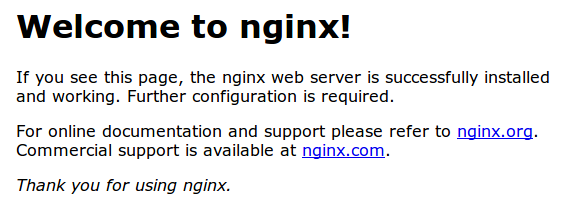 ! If you see this page, then your web server is now correctly installed.
Before continuing, you will want to do is enable Nginx to start on boot. Use the following command to do so:
# sudo systemctl enable nginx
How To Find Your Server's Public IP Address
If you do not know what your server's public IP address is, there are a number of ways you can find it. Usually, this is the address you use to connect to your server through SSH.
From the command line, you can find this a few ways. First, you can use the iproute2 tools to get your address by typing this:
# ip addr show eth0 | grep inet | awk '{ print $2; }' | sed 's/\/.*$//'
This will give you one or two lines back. They are both correct addresses, but your computer may only be able to use one of them, so feel free to try each one.
An alternative method is to use an outside party to tell you how it sees your server. You can do this by asking a specific server what your IP address is:
# curl http://icanhazip.com
Regardless of the method you use to get your IP address, you can type it into your web browser's address bar to get to your server.
--- end of step 1.......
Step 2 — Install MySQL (MariaDB)
Now that we have our web server up and running, it is time to install MariaDB, a MySQL drop-in replacement. MariaDB is a community-developed fork of the MySQL relational database management system. Basically, it will organize and provide access to databases where our site can store information.
Again, we can use yum to acquire and install our software. This time, we'll also install some other "helper" packages that will assist us in getting our components to communicate with each other:
# sudo yum install mariadb-server mariadb
When the installation is complete, we need to start MariaDB with the following command:
# sudo systemctl start mariadb
Now that our MySQL database is running, we want to run a simple security script that will remove some dangerous defaults and lock down access to our database system a little bit. Start the interactive script by running:
# sudo mysql_secure_installation
The prompt will ask you for your current root password. Since you just installed MySQL, you most likely won’t have one, so leave it blank by pressing enter. Then the prompt will ask you if you want to set a root password. Go ahead and enter Y, and follow the instuctions:
mysql_secure_installation prompts:
Enter current password for root (enter for none):
OK,
successfully used password, moving on...
Setting the root password ensures that nobody can log into the MariaDB
root user without the proper authorisation.
New password: password
Re-enter new password: password
Password updated successfully!
Reloading privilege tables..
... Success!
For the rest of the questions, you should simply hit the "ENTER" key through each prompt to accept the default values. This will remove some sample users and databases, disable remote root logins, and load these new rules so that MySQL immediately respects the changes we have made.
The last thing you will want to do is enable MariaDB to start on boot. Use the following command to do so:
# sudo systemctl enable mariadb
At this point, your database system is now set up and we can move on.
--- end of step 2....
Step 3 — Install PHP
PHP is the component of our setup that will process code to display dynamic content. It can run scripts, connect to our MySQL databases to get information, and hand the processed content over to our web server to display.
We can once again leverage the yum system to install our components. We're going to include the php-mysql and php-fpm packages as well:
# sudo yum install php php-mysql php-fpm
Configure the PHP Processor
We now have our PHP components installed, but we need to make a slight configuration change to make our setup more secure.
Open the main php-fpm configuration file with root privileges:
# sudo nano /etc/php.ini
What we are looking for in this file is the parameter that sets cgi.fix_pathinfo. This will be commented out with a semi-colon (;) and set to "1" by default.
This is an extremely insecure setting because it tells PHP to attempt to execute the closest file it can find if a PHP file does not match exactly. This basically would allow users to craft PHP requests in a way that would allow them to execute scripts that they shouldn't be allowed to execute.
We will change both of these conditions by uncommenting the line and setting it to "0" like this:
# sudo nano /etc/php.ini
find & change to.. cgi.fix_pathinfo=0
Save and close the file when you are finished.
Next, open the php-fpm configuration file www.conf:
# sudo nano /etc/php-fpm.d/www.conf
Find the line that specifies the listen parameter, and change it so it looks like the following:
1/3
# sudo nano /etc/php-php.d/www.conf
listen = /var/run/php-fpm/php-fpm.sock
Next, find the lines that set the listen.owner and listen.group and uncomment them. They should look like this:
2/3
# sudo nano /etc/php-php.d/www.conf
listen.owner = nobody
listen.group = nobody
Lastly, find the lines that set the user and group and change their values from "apache" to "nginx":
3/3
# sudo nano /etc/php-php.d/www.conf
user = nginx
group = nginx
Then save and quit.
Now, we just need to start our PHP processor by typing:
# systemctl start php-fpm
This will implement the change that we made.
Next, enable php-fpm to start on boot:
# systemctl enable php-fpm
----- end step 3.....
Step 4 — Configure Nginx to Process PHP Pages
Now, we have all of the required components installed. The only configuration change we still need to do is tell Nginx to use our PHP processor for dynamic content.
We do this on the server block level (server blocks are similar to Apache's virtual hosts). Open the default Nginx server block configuration file by typing:
# sudo nano /etc/nginx/conf.d/default.conf
Currently, with the comments removed, the Nginx default server block looks like this:
/etc/nginx/conf.d/default.conf — originalserver
{
listen 80;
server_name localhost;
location /
{
root /usr/share/nginx/html;
index index.html index.htm;
}
error_page 500 502 503 504 /50x.html;
location = /50x.html {
root /usr/share/nginx/html; }
}
We need to make some changes to this file for our site.
First, we need to add an index.php option as the first value of our index directive to allow PHP index files to be served when a directory is requested
We also need to modify the server_name directive to point to our server's domain name or public IP address
The actual configuration file includes some commented out lines that define error processing routines. We will uncomment those to include that functionality
For the actual PHP processing, we will need to uncomment a portion of another section. We will also need to add a try_files directive to make sure Nginx doesn't pass bad requests to our PHP processor
The changes that you need to make are in red in the text below. If you prefer, you may just copy and paste everything, then replace the value of server_name with the appropriate domain name or IP address:
# /etc/nginx/conf.d/default.conf — updatedserver
{
listen 80;
server_name server_domain_name_or_IP;
# note that these lines are originally from the "location /" block
root /usr/share/nginx/html;
index index.php index.html index.htm;
location / {
try_files $uri $uri/ =404;
}
error_page 404 /404.html;
error_page 500 502 503 504 /50x.html;
location = /50x.html {
root /usr/share/nginx/html;
}
location ~ \.php$ {
try_files $uri =404;
fastcgi_pass unix:/var/run/php-fpm/php-fpm.sock;
fastcgi_index index.php;
fastcgi_param SCRIPT_FILENAME $document_root$fastcgi_script_name;
include fastcgi_params;
}
}
When you've made the above changes, you can save and close the file.
!! Restart Nginx to make the necessary changes:
# sudo systemctl restart nginx
--- end step 4...
Step 5 — Test PHP Processing on your Web Server
In order to test that our system is configured properly for PHP, we can create a very basic PHP script.
We will call this script info.php. In order for Apache to find the file and serve it correctly, it must be saved to a very specific directory, which is called the "web root".
In CentOS 7, this directory is located at /usr/share/nginx/html/. We can create the file at that location by typing:
# sudo vi /usr/share/nginx/html/info.php
This will open a blank file. We want to put the following text, which is valid PHP code, inside the file:
Test PHP Script
When you are finished, save and close the file.
Now we can test whether our web server can correctly display content generated by a PHP script. To try this out, we just have to visit this page in our web browser. You'll need your server's public IP address again.
The address you want to visit will be:
Open in a web browser:
## http://your_server_IP_address/info.php
The page that you come to should look something like this:
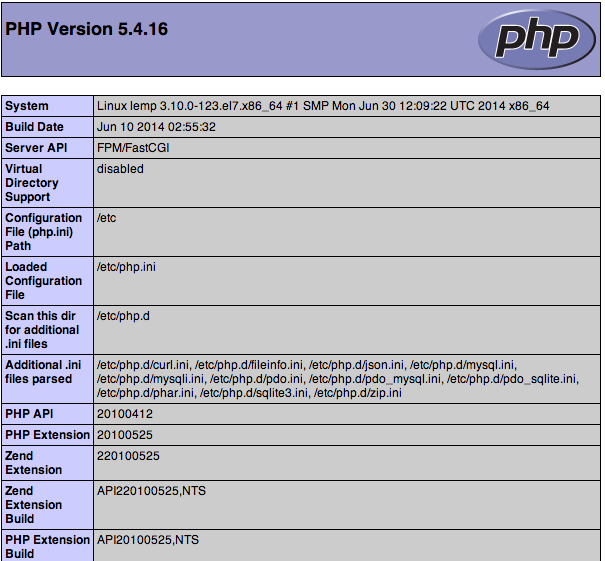
This page basically gives you information about your server from the perspective of PHP. It is useful for debugging and to ensure that your settings are being applied correctly.
If this was successful, then your PHP is working as expected.
You probably want to remove this file after this test because it could actually give information about your server to unauthorized users. To do this, you can type this:
sudo rm /usr/share/nginx/html/info.php
You can always recreate this page if you need to access the information again later.
Conclusion
Now that you have a LEMP stack installed, you have many choices for what to do next. Basically, you've installed a platform that will allow you to install most kinds of websites and web software on your server.
--- end step 5...
... you are finish... Good luck...


